Specs at a Glance
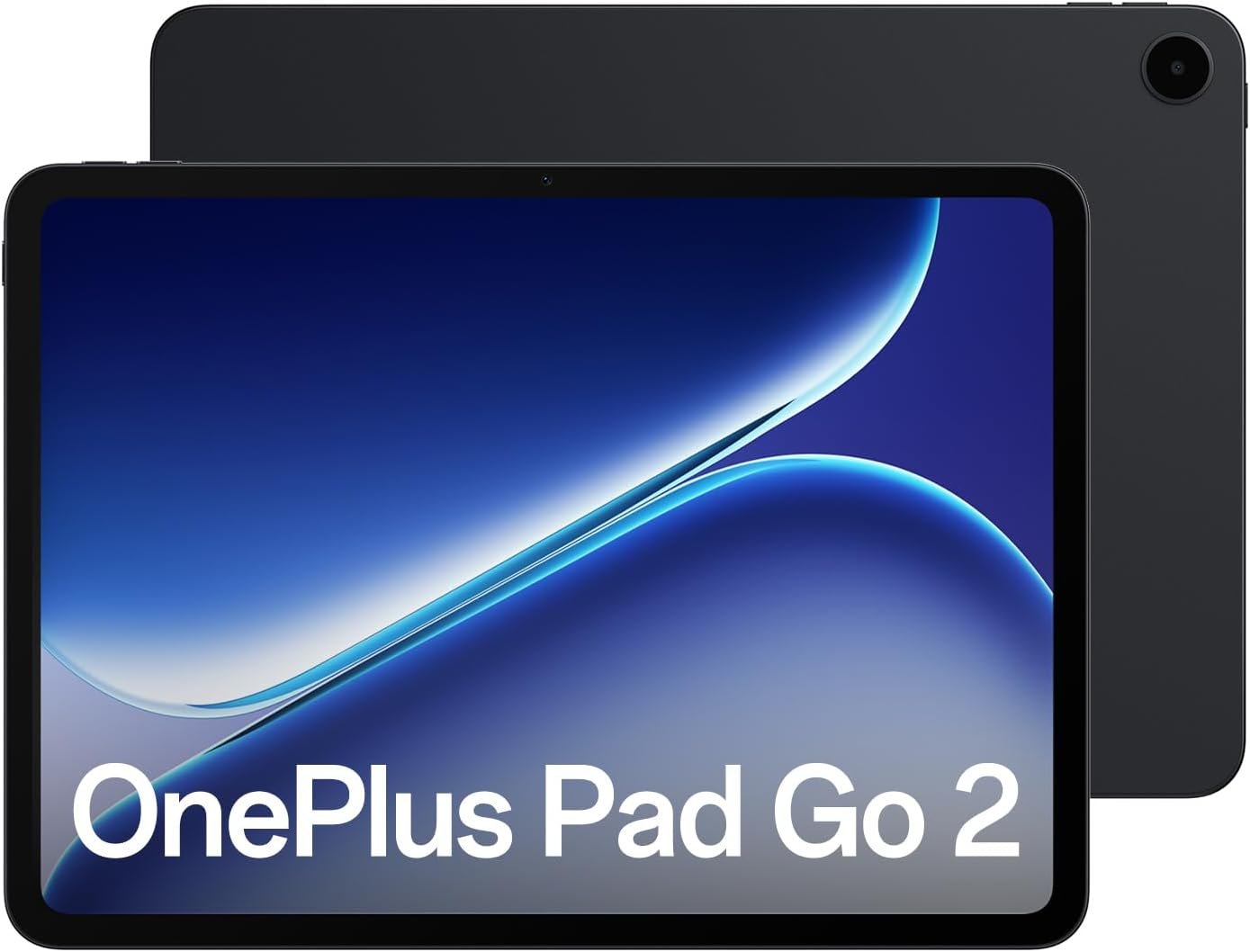
Before we get into the nitty-gritty of how this thing actually feels to use, let’s get the nerdy stuff out of the way. Here is what the OnePlus Pad Go 2 is packing under the hood:
- Display: 12.1-inch IPS LCD, 2.8K Resolution (2800 x 1980), 120Hz Refresh Rate, 900 nits peak brightness.
- Processor: MediaTek Dimensity 7300-Ultra (4nm).
- RAM: 8GB LPDDR5X.
- Storage: 128GB or 256GB UFS 3.1 (expandable via microSD).
- Battery: 10,050 mAh with 33W SuperVOOC charging.
- Audio: Quad Stereo Speakers with Omnibearing Sound Field.
- Cameras: 8MP Rear, 8MP Front.
- Connectivity: Wi-Fi 6, Bluetooth 5.4, 5G (optional).
- Software: OxygenOS 16 based on Android 16.
- Dimensions: 6.8mm thickness, approx 599g.
- Colors: Shadow Black, Lavender Drift.
Design and Build Quality
Let’s talk looks. The first time I pulled the OnePlus Pad Go 2 out of the box, the first thing that hit me was the heft—but in a good way. It feels substantial. OnePlus has ditched the slightly curved edges of the previous generation for a flatter, more industrial design that screams “modern.” It’s definitely taking some design cues from the Cupertino giant, but with enough OnePlus DNA to stand on its own.
I’m reviewing the Lavender Drift colorway, and honestly? It’s a vibe. It’s not that in-your-face purple that looks like a grape soda; it’s this subtle, metallic pastel that shifts a bit depending on how the light hits it. If you prefer to fly under the radar, the Shadow Black version is sleek, but the Lavender has a personality.
The unibody metal chassis feels cool to the touch and incredibly rigid. There’s no flex here. When you hold it in landscape mode, your hands naturally rest on the sides without covering the quad speakers (more on those later). At 6.8mm thin, it slides into a messenger bag or a backpack laptop sleeve without creating a bulge.
One thing I really appreciate is the button placement. The power button is on the top left (in landscape), and the volume rocker is on the top edge, also towards the left. It takes a day to get used to if you’re coming from a phone where everything is on the right, but once you adjust, the muscle memory kicks in.
The camera module on the back is circular and centered, which is a classic OnePlus aesthetic. It protrudes slightly, so if you’re typing on a flat table without a case, you will get a little bit of wobble. But let’s be honest, who uses a tablet naked these days? Slap the magnetic folio case on it, and the wobble vanishes.

Display: The Star of the Show
If you are buying a tablet, you are buying a screen. That’s the deal. And in this OnePlus Pad Go 2 review, I have to give credit where it’s due: this display is a stunner for the price point.
We are looking at a 12.1-inch IPS LCD panel. Now, I know the OLED purists might be rolling their eyes right now, wishing for those infinite blacks. But hear me out. This LCD is high quality. The colors are punchy without being oversaturated, and with Dolby Vision support, watching HDR content on Netflix or Disney+ is a genuine treat.
The resolution is 2.8K (2800 x 1980). Text looks razor-sharp. I spent hours reading manga and long-form articles on this thing, and I never felt like I was squinting at pixels. The pixel density is high enough that unless you have a magnifying glass, you aren’t going to see jagged edges.
The 7:5 Aspect Ratio
This is the secret sauce. Most tablets stick to 16:10 or 16:9, which is great for movies but terrible for… literally everything else. OnePlus stuck with their 7:5 aspect ratio, calling it “ReadFit.” It’s boxier, more like a sheet of A4 paper.
Why does this matter?
- Web Browsing: You see more vertical content.
- Split Screen: When you run two apps side-by-side, they look like two almost-square phone screens rather than two skinny, unusable towers.
- Reading: It feels like holding a magazine.
I cannot overstate how much better this ratio is for productivity. Editing a Google Doc feels natural because you can see the whole page width without zooming out to 50%.
Brightness and 120Hz
The screen hits a peak brightness of 900 nits. Is it readable under direct sunlight at the beach? Just barely. But for anywhere else—a bright coffee shop, a train, your office—it gets plenty bright.
And yes, it has a 120Hz refresh rate. This is non-negotiable in 2026. Scrolling through Twitter (or X, or whatever we are calling it now) or navigating the UI is buttery smooth. It makes the tablet feel faster than it actually is because the touch response is so immediate.
Performance: “Go” Explained
The “Go” in the name implies mobility and value, not raw, flagship-killing power. The OnePlus Pad Go 2 is powered by the MediaTek Dimensity 7300-Ultra.
If you’re a benchmark chaser, this chip isn’t going to break any records. It’s a solid, dependable mid-range workhorse. During my testing, I threw my daily chaos at it: Slack running in the background, a YouTube video playing in a floating window, and about 15 tabs open in Chrome.
The result? It held up surprisingly well. The 8GB of LPDDR5X RAM definitely helps here. Apps stay in memory longer than I expected, and switching between them is snappy. I didn’t experience any major lock-ups or stuttering during general UI navigation.
Gaming Performance
Can it game? Yes, but with caveats.
- Casual Games: Candy Crush, Among Us, Stardew Valley run perfectly. No issues at all.
- Competitive Shooters: I played a few rounds of Call of Duty Mobile and PUBG. You can play smoothly at Medium to High settings. If you try to max out the graphics to “Ultra” with max frame rates, the tablet will start to get warm and frames will drop during intense firefights.
- Heavy Hitters: Genshin Impact is playable, but you’ll want to cap it at 30fps on Medium settings for a consistent experience. If you push for 60fps, expect some thermal throttling after 20 minutes.
Essentially, for 90% of users, the performance is more than enough. If you are a professional video editor or a hardcore mobile gamer, you should probably be looking at the flagship OnePlus Pad 2 or an iPad Pro. But for the student taking notes or the commuter watching movies? It’s golden.
Software: OxygenOS 16
The hardware is only half the story. The software experience on Android tablets has historically been… let’s say, “messy.” But OnePlus has done a lot of work with OxygenOS 16.
It’s built on Android 16, so you get all the latest security features and privacy tweaks. But the real magic is in the multitasking features.
Open Canvas
This is the killer feature. Open Canvas allows you to multitask in a way that actually makes sense. You can have three apps open at once, but instead of cramming them all onto the screen and making them tiny, the software “extends” your screen virtually.
You can have a browser and a note-taking app side-by-side. Then, if you want to check your messages, you can slide the message app in from the side, pushing the browser slightly off-screen. It feels like shuffling papers on a desk. It is intuitive, fluid, and frankly, better than Samsung’s DeX for touch-first use.
The Dock and Taskbar
There’s a persistent taskbar at the bottom (which you can hide) that holds your recent apps and a file drawer. Dragging an app from the taskbar to the screen instantly launches split-screen. It’s seamless.
Bloatware
There is very little bloatware here. You get the standard suite of OnePlus apps (Notes, Community, etc.) and the Google suite. No random gambling games or sketchy antivirus pre-installed. It’s a clean, breathable OS.
Audio and Camera
The Audio: The quad-speaker setup is legit. It uses something called “Omnibearing Sound Field” technology. Fancy naming aside, it means the tablet knows how you are holding it and adjusts the left/right stereo channels accordingly.
The volume gets loud. You can easily fill a small hotel room with music. The bass is punchy for a tablet, and dialogue in movies comes through crisp and clear. I watched the latest episode of The Mandalorian without headphones, and the sound separation during the dogfights was impressive.
The Cameras: It’s a tablet. You have an 8MP rear camera and an 8MP front camera.
- Rear Camera: It’s there for scanning documents. That’s it. Don’t try to take vacation photos with it; they will look grainy and flat. But for scanning a contract to sign? It works perfectly with the AI document scanner mode.
- Front Camera: This is actually quite decent for video calls. The placement is on the longer edge (landscape), which is where it should be. You’re centered in the frame during Zoom calls rather than looking off to the side like on some older iPads. It handles lighting okay, though you might look a bit soft in a dim room.
Battery Life and Charging
Here is where the OnePlus Pad Go 2 absolutely flexes on the competition. It packs a massive 10,050 mAh battery. For context, many laptops don’t even have batteries this big.
During my review period, getting this thing to die was a challenge.
- Heavy Use Day: 3 hours of writing, 2 hours of Netflix, 1 hour of gaming, and constant social media checking. I ended the day with 35% still in the tank.
- Light Use: If you just use it for an hour or two of reading in the evening, you can easily go 4 or 5 days without charging.
OnePlus claims up to 15 hours of continuous video playback, and my tests back that up. I looped a 1080p video at 50% brightness, and it ran for nearly 16 hours before shutting down. That is a transatlantic flight plus a layover, easy.
Charging: It supports 33W SuperVOOC charging. It’s not the blazing fast 67W or 100W we see on OnePlus phones, but considering the size of the battery, it’s decent. You can get from 0% to 50% in about an hour. A full charge takes a little over two hours.
A nice bonus is the 6.5W reverse charging. If your phone is dying, you can plug it into the tablet via USB-C and use the tablet as a massive power bank. It’s a lifesaver feature that you don’t realize you need until you need it.
Accessories: The Stylo and Keyboard
I have to mention the accessories because they transform this from a media slate into a productivity tool.
OnePlus Pad Go 2 Stylo: This is sold separately, but if you are a student, buy it. It supports 4,096 levels of pressure sensitivity. The latency is very low—not quite Apple Pencil Pro level, but very close. Writing on the glass feels smooth. The “Note” app has a handwriting-to-text feature that works surprisingly well, even with my messy chicken scratch.
The Folio Keyboard: The keyboard case is decent. The key travel is a bit shallow, but the spacing is good. I typed about half of this review on the tablet itself. It connects via pins, so no Bluetooth pairing or charging required. It does add some weight, but it also offers solid protection.
Who is this actually for?
Throughout this OnePlus Pad Go 2 review, I’ve been trying to pin down the perfect user for this device. I think it fits three specific vibes:
1. The “Uni Student” Vibe You need something to read textbooks (PDFs look great on the 7:5 screen), take handwritten notes during lectures, and watch movies in the dorm. You don’t want to carry a charger to campus. The Pad Go 2 is perfect for this. It’s cheaper than a laptop but does 80% of the portable tasks.
2. The “Commuter” Vibe You spend an hour on the train or bus every day. You want to catch up on shows, read the news, or triage emails before you get to the office. The LTE/5G option is a game-changer here. Being always connected without draining your phone’s hotspot battery is a luxury that is worth the extra cash.
3. The “Parent” Vibe You need a shared family device. The Kids Space on Android is great, the screen is durable enough, and the battery lasts forever. It’s the device you hand to the kid in the backseat for a long drive, but it’s also nice enough for you to reclaim in the evening for some online shopping.
Pros and Cons
Pros:
- Stunning Display: 2.8K, 120Hz, and that 7:5 ratio is a productivity dream.
- Battery Beast: 10,050mAh basically guarantees all-day (and next-day) life.
- Build Quality: Feels premium, looks great in Lavender Drift.
- Software: Open Canvas makes multitasking actually usable.
- Price: High value for the hardware you get.
Cons:
- Charging Speed: 33W is okay, but 67W would have been better for a battery this size.
- Camera: Just passable. Don’t expect magic.
- Gaming Caps: Not for hardcore gamers wanting 60fps on Ultra settings.
- Accessories not included: You have to buy the Stylo and Case separately, raising the total cost.
Detailed Deep Dive: The AI Features
I wanted to save a specific section for this because “AI” is the buzzword of the decade. Does the AI in the OnePlus Pad Go 2 actually do anything, or is it just marketing fluff?
OxygenOS 16 brings a few “OnePlus AI” features to the table.
- AI Writer: This helps you compose emails or rewrite text in different tones. I used it to draft a few quick replies. It’s powered by Google’s Gemini models on the backend (fitting, right?). It’s useful if you have writer’s block, but it’s not revolutionary.
- AI Recorder: This is actually cool. If you record a lecture or a meeting, it can generate a summary for you. I tested this with a 10-minute YouTube video playing in the background, and it captured the main bullet points with about 85% accuracy. For students, this is a killer feature.
- Smart Cutout: You can long-press a subject in a photo, and it instantly cuts them out as a sticker. Fun for memes, not crucial for life.
Overall, the AI stuff is nice to have, but I wouldn’t buy the tablet just for this. It’s the cherry on top, not the sundae.
Connectivity and The “Ecosystem” Play
OnePlus is trying hard to build an ecosystem like Apple. If you have a OnePlus phone (like the OnePlus 12, 13, or the new 15R), the Pad Go 2 plays very nicely with it.
Content Sync: You can copy text on your phone and paste it directly onto the tablet. You can take a photo on your phone, and it instantly pops up on the tablet for editing.
Cellular Data Sharing: If you have the Wi-Fi-only version of the tablet, it can piggyback off your OnePlus phone’s 5G signal seamlessly without you having to manually turn on the hotspot and type in a password. It just works.
App Handoff: Open an app on your phone, and an icon appears on the tablet dock to pick up where you left off. It works best with native apps, but support is growing.
If you don’t have a OnePlus phone, you miss out on these specific continuity features, but the tablet still functions perfectly as a standalone Android device.
Verdict: Should You Buy It?
After spending quality time with this device for this OnePlus Pad Go 2 review, I’ve come to a pretty clear conclusion.
The OnePlus Pad Go 2 is the Toyota Camry of tablets. That sounds like an insult, but it’s the highest compliment. It is reliable, it looks good, it has all the features you actually need, and it won’t bankrupt you. It lacks the flashy, overpowered engine of a Ferrari (iPad Pro), but it will get you where you need to go comfortably and efficiently.
It corrects almost every gripe people had with the original. The screen is bigger and faster. The battery is massive. The processor is capable enough to ensure longevity.
Buy it if:
- You want a high-quality screen for movies and reading without paying “Pro” prices.
- You prioritize battery life above all else.
- You want a secondary device for school or light office work.
Skip it if:
- You are a professional digital artist (iPad is still king there).
- You want to play Genshin Impact at max settings for hours.
- You need a tablet that fits in a jacket pocket (this 12.1-inch boy is too big for that).
Ultimately, OnePlus has proved that the mid-range tablet market isn’t dead—it was just waiting for the right device. And the Pad Go 2 might just be it.
Final Thoughts
The tablet landscape is shifting. We are seeing a move away from “cheap plastic slates” toward “affordable premium” devices, and the OnePlus Pad Go 2 is leading that charge. It respects your wallet while still feeling like a luxury product.
If you’re sitting on the fence, consider what your daily screen time looks like. If 80% of it is scrolling, watching, and light typing, this tablet is going to make you very happy.