

This Bitdefender review comes down to a fairly straightforward recommendation: its malware protection deserves your confidence, its better security extras justify paying for them, and its subscription options need more scrutiny than they should.
This article may contain affiliate links. Tech Info Central may earn a commission when you purchase through these links. This does not affect our editorial views or recommendations.
Bitdefender sells antivirus software and broader security subscriptions for Windows, macOS, Android and iOS. This review covers the current consumer range, concentrating on Total Security and the additional services in Premium Security and Ultimate Security.
There is plenty to like. Independent laboratories continue to report excellent protection, Windows users receive unusually useful banking and ransomware safeguards, and the family subscriptions can cover a substantial collection of devices. The scam tools also address a problem traditional antivirus cannot solve alone: persuading someone to recognise a fraudulent message before they hand over money.
The reservations are real. Total Security’s bundled VPN remains severely restricted. Renewal costs can change the value calculation considerably. Features differ substantially between operating systems, and Bitdefender is not invariably the lightest antivirus in independent performance tests.
Even with those qualifications, Total Security is my preferred starting point for most buyers. Premium Security becomes the better purchase if you actually need its unlimited VPN and added scam protection. Paying for the most expensive package simply because it sounds safest makes much less sense.
Bitdefender at a glance
| Item | Assessment |
|---|---|
| Best for | Windows users and households wanting security across several devices |
| Platforms | Windows, macOS, Android and iOS, with different features |
| Device allowances | Antivirus Plus: one or three; main Individual plans: five; Family plans: 25 across five accounts |
| Current paid starting offer | US$24.99 for the first year of one-device Antivirus Plus |
| Free options | Windows Antivirus Free; separate free Android antivirus; suite trials |
| Trial and refund | Selected suites offer 30-day trials; qualifying purchases have a 30-day money-back guarantee |
| Strongest features | Malware defence, ransomware safeguards, banking protection and layered scam tools |
| Biggest drawbacks | Renewal complexity, restricted entry-level VPN and uneven platform coverage |
The current Windows release is 27.0.62.355, released on 9 September 2026, with updates distributed progressively. The lab results below concern earlier tested builds, rather than a separate certification of this September update.
Plans and pricing: choose the services you will actually use
The current range needs explaining because older buying guides describe a different portfolio.
Antivirus Plus now has a multiplatform edition. Describing the current product universally as Windows-only is outdated. Total Security, Premium Security and Ultimate Security are available as Individual and Family subscriptions, with the latter covering five accounts and 25 devices. Legacy licences and retailer packages can have different allowances.
Current introductory offers
These are advertised US first-year prices, checked on 12 September 2026, before applicable sales tax. They are not UK prices or guaranteed renewal rates.
| Plan | Accounts / devices | First year |
|---|---|---|
| Antivirus Plus Multiplatform | 1 / 1 | $24.99 |
| Antivirus Plus Multiplatform | 1 / 3 | $29.99 |
| Total Security Individual | 1 / 5 | $59.99 |
| Total Security Family | 5 / 25 | $79.99 |
| Premium Security Individual | 1 / 5 | $79.99 |
| Premium Security Family | 5 / 25 | $99.99 |
| Ultimate Security Individual | 1 / 5 | $89.99 |
| Ultimate Security Family | 5 / 25 | $119.99 |
| Ultimate Security Plus Individual, Standard | 1 / 5 | $119.99 |
| Ultimate Security Plus Individual, Extended | 1 / 5 | $139.99 |
| Ultimate Security Plus Family, Extended | 5 / 25 | $199.99 |
A Standard Ultimate Security Plus Family option is also advertised; compare its local checkout quote with Extended.
For UK context, the following Individual-plan prices were published on 13 July 2026. They are a dated reference, not a verified September checkout quotation. The Standard’s July 2026 review reported:
| UK Individual plan | First year | Reported subsequent annual price |
|---|---|---|
| Total Security | £49.99 | £84.99 |
| Premium Security | £59.99 | £99.99 |
| Ultimate Security | £69.98 | £119.99 |
Current numeric renewal quotations could not be independently confirmed across the range. Check the renewal amount displayed for your country, device allowance and subscription term before paying. A crossed-out reference price is not necessarily a promise about your next bill.
What the different tiers add
| Tier | Main additions | VPN allowance |
|---|---|---|
| Antivirus Plus | Core device and web protection | 200MB daily per device |
| Total Security | Broader device tools, Windows firewall and optimisation, SecurePass | 200MB daily per device |
| Premium Security | Scam Protection Pro and cloud Email Protection | Unlimited data |
| Ultimate Security | Digital identity and breach monitoring | Unlimited data |
| Ultimate Security Plus, US | Identity restoration, credit monitoring and insurance benefits according to option | Unlimited data |
| Family versions | Separate member accounts, 25-device allowance and parental controls | Follows the tier, with account restrictions |
Features remain platform-dependent. Family child profiles do not receive every adult service: children get Security and Parental Control, rather than automatic access to every premium VPN or password service.
Total Security offers the most sensible balance if you already have a VPN. Premium’s upgrade is easier to justify if it replaces a separate subscription. Ultimate is for people who want monitoring beyond their devices.
The 200MB allowance feels particularly ungenerous in a paid suite. It is enough for occasional use, but it makes Premium a near-inevitable upgrade for anyone expecting an everyday VPN.
Selected suites offer 30-day trials and a 30-day money-back guarantee. Check the terms attached to your purchase, especially through retailers or app stores. Existing customers should also verify renewal-code compatibility: a similarly named new subscription may not extend an older licence directly.
Installation, the interface and Bitdefender Central
Setup begins with a Bitdefender account and subscription activation in Central. Download the installer, follow its prompts, allow the initial updates and run an initial scan. Existing antivirus software or remnants of an old installation can complicate setup, so resolve any compatibility warning before proceeding.
Adding another device is straightforward in principle: Central can provide a download link or QR code for the appropriate installer. Shared installation links expire, which is sensible security but occasionally means generating another one.
The longer part is activating the extras. Mac protection needs the appropriate system permissions. Android web and scam protection require permissions beyond installing an ordinary app. Browser extensions, SecurePass and mailbox protection each have their own setup. Beginners should allow time for this rather than assuming that one completed installer means every advertised service is active.
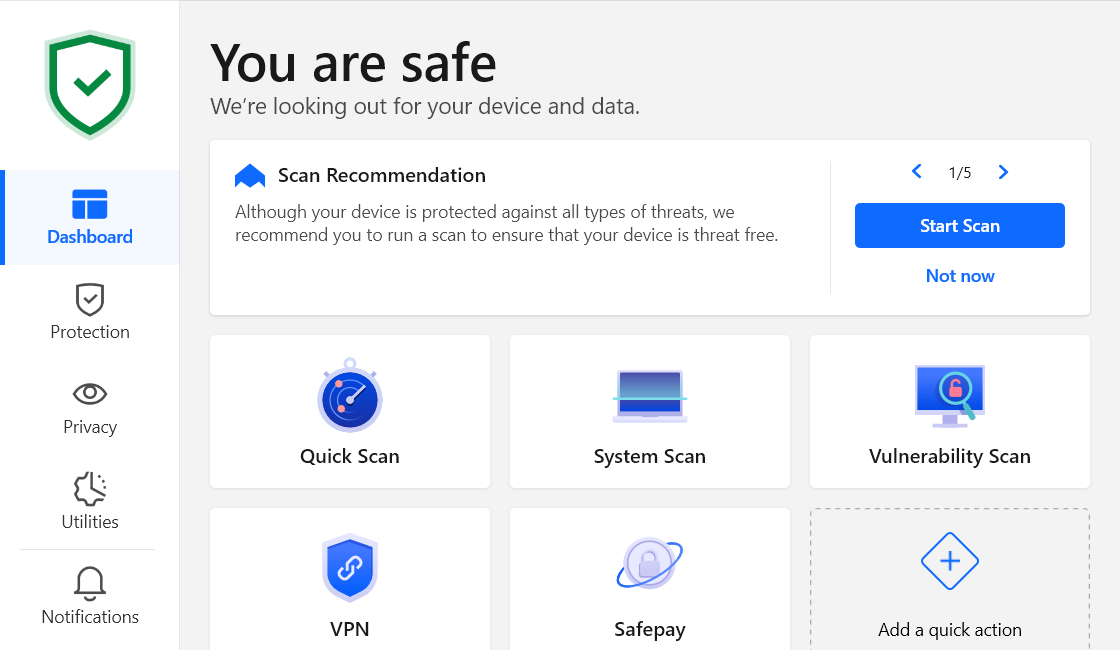
The desktop interface separates routine protection from deeper settings, with configurable Quick Actions providing shortcuts to frequently used tools. That is a good compromise: starting a scan should not require exploring the same screens used to create firewall rules.
There is some presentational untidiness. Traditional desktop interfaces use Protection, Privacy and Utilities, whereas newer App or Hub screens organise services and family management differently. Instructions and screenshots will not always match the screen in front of you.
Central is one of the more valuable parts of the package. It brings devices, security events, subscriptions and supported remote actions together, including remote scans where available. Subscription management and adding protection to a replacement computer belong here too. Family dashboards provide member status and activity without requiring everyone to share one login. Mobile access is useful, although some management functions lead to web pages rather than remaining entirely inside an app.
Malware protection: the strongest reason to buy
Feature counts would mean little if Bitdefender’s underlying protection were mediocre. The independent evidence gives it a much stronger foundation than that.
Recent independent results
| Test and date | Bitdefender result | What it tells us |
|---|---|---|
| AV-TEST, May–June 2026, Windows 11 | 18/18; 100% protection in both tested threat categories | Excellent protection, performance and usability under this methodology |
| AV-Comparatives Real-World Protection, February–May 2026 | 99.5%; 398 of 400 cases blocked | Strong practical protection, with two compromises |
| AV-Comparatives Malware Protection, March 2026 | 99.94% online protection; four false alarms | Excellent protection, but neither perfect nor false-positive-free |
| AV-Comparatives Performance, April 2026 | Impact score 9.6; ninth place | Several competitors imposed less measured overhead |
| AV-Comparatives Anti-Phishing Certification, May 2025 | 95% detection; no false alarms on 200 legitimate sites | Encouraging specialist evidence, though older than the malware tests |
Sources: AV-TEST, AV-Comparatives Real-World Protection, AV-Comparatives Malware Protection, AV-Comparatives Performance and AV-Comparatives Anti-Phishing Certification.
The distinction between detection and protection matters. In March’s malware test, Bitdefender’s offline and online detection rates were both 97.6%, but its online protection result rose to 99.94% once the full defence process was allowed to operate. Recognising a file immediately and preventing it from doing harm are related, but different, measurements.
Small gaps between leading products should not be exaggerated either. AV-Comparatives placed several competitors in the same statistical protection group. One test does not establish an eternal league table.
SE Labs’ April–June 2026 home report did not list Bitdefender among its tested consumer products. Business-product awards should not be substituted for a missing Total Security result. SE Labs consumer report.
Real-time protection and Advanced Threat Defense
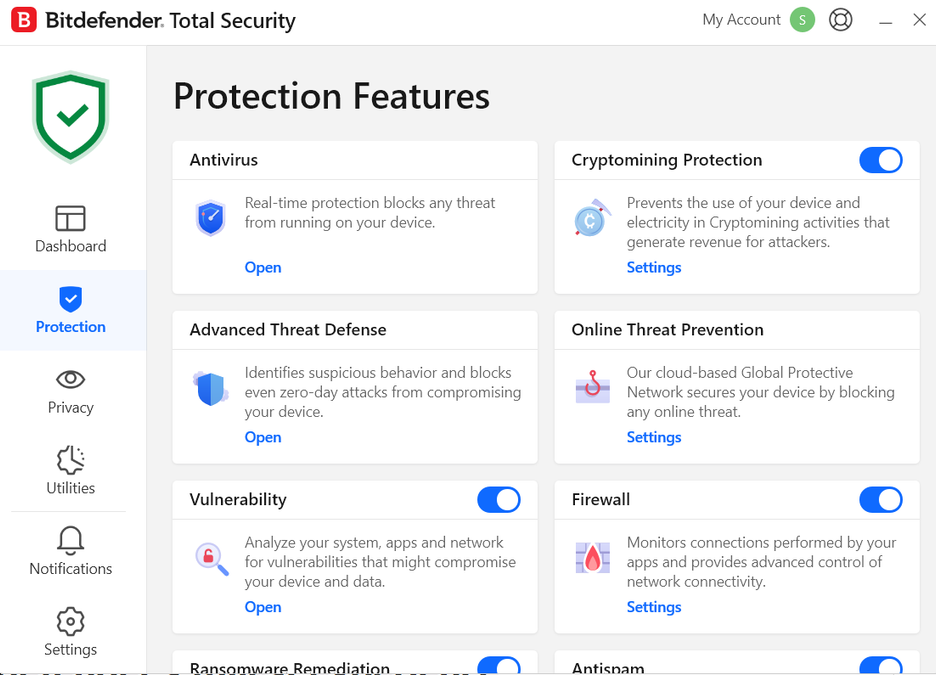
On-access scanning checks files as they are opened, copied or otherwise accessed. Local detection works alongside cloud-assisted analysis, with quarantine and remediation handling identified threats. Settings also cover potentially unwanted applications and malicious scripts, including PowerShell and Office-related activity.
That combination addresses familiar viruses, trojans, worms and spyware, as well as attacks that rely on scripts or legitimate system tools. Rootkit handling can require deeper scanning or a restart into a rescue environment.
The behavioural component, officially named Advanced Threat Defense, deserves particular credit. Instead of relying only on a known malicious signature, it watches what applications do. Code injection, suspicious registry changes and other actions contribute to a behavioural assessment. A harmless-looking executable can therefore attract attention once it starts behaving like an attacker’s tool.
This is important for new threats and some fileless attacks. It is not a guarantee that every unfamiliar attack will be recognised. Behavioural monitoring must also distinguish malicious actions from legitimate software doing complicated things.
Defaults are the right starting point for most people. Advanced users can create exceptions, but excluding broad folders or entire tools to silence an alert can remove precisely the protection they bought.
Windows: Bitdefender’s fullest experience
Windows receives the strongest argument for paying. Malware protection is joined by banking isolation, network controls, privacy permissions and recovery-related safeguards that do not appear uniformly elsewhere.
Ransomware protection and recovery
Bitdefender combines behavioural detection with Ransomware Remediation, which can preserve affected files and restore them after an attack has been stopped. Automatic restoration can be configured, and recovery information is available for inspection.
I particularly like the emphasis on limiting damage as well as recognising the attacker. Blocking ransomware after it has altered several documents is better than letting it finish, but recovering those documents is better still.
The limits need equal prominence. This is not a universal decryptor, it cannot promise recovery from every attack, and it does not replace an independent backup. Mac users receive a different combination of protected folders and Time Machine safeguards, discussed below.
Vulnerability checks and network defence
The vulnerability scan looks for missing Windows updates, selected outdated applications, weak Windows account passwords and unsafe settings. Wi-Fi checks can identify relevant network-security weaknesses. It is a useful housekeeping prompt, particularly for someone who habitually postpones updates, but not an exhaustive audit of every device on the network.
Network Threat Prevention adds checks for exploits, brute-force activity, botnet communication and suspicious connections. Cryptomining Protection, included in the broader suites, addresses software using your resources to mine cryptocurrency without permission. These are more worthwhile additions than another vague “speed boost” button.
Firewall
The Windows firewall controls incoming and outgoing connections through application rules, network profiles and advanced settings. Home/Office and Public profiles help distinguish trusted networks from unfamiliar ones. Stealth and port-scan controls offer further adjustments.
Most users should leave routine decisions automatic. Alert mode is available for people who want to approve connections themselves, but enabling it affects Profiles, so it is not simply a free increase in visibility. Overly restrictive rules can also interfere with printers or local sharing.
Windows already includes a capable firewall. Bitdefender’s contribution is integrated management and additional controls, rather than rescuing an otherwise unprotected operating system. Its own firewall is not included on Mac, Android or iOS.
Safepay, webcam and microphone protection
Safepay remains a worthwhile Windows extra in 2026. Its separate banking browser uses an isolated desktop, screenshot protection and a virtual keyboard to reduce certain interception risks. It can recognise banking sites and offer to open them, with bookmarks and current SecurePass integration helping regular use.
The inconvenience is switching away from your normal browser. I would accept that for sensitive banking, particularly on a shared PC, but probably not for every small purchase. Safepay cannot make a fraudulent payment legitimate or replace the bank’s authentication checks.
Webcam Protection can allow trusted applications, alert about access and block unwanted use. Microphone Monitor has a narrower role: it reports microphone access rather than providing equivalent blocking controls. That distinction is easily lost in a combined “webcam and microphone protection” label.
Web, phishing and scam protection
A fraudulent login page does not need to infect your computer. It only needs you to type.
Bitdefender’s web protection therefore matters as much as its file scanner for many households. It checks malicious and fraudulent destinations, helping interrupt unsafe links, redirects and download paths before the next stage of an attack. Windows Online Threat Prevention and the Mac TrafficLight extension provide different routes to this protection.
Search Advisor remains available, providing warnings alongside supported search results. Browser, search-engine and extension compatibility still matter; do not assume identical badges appear everywhere.
The 95% phishing result in the table is encouraging, but it is a May 2025 certification, not proof that every current fake shop or AI-generated message will be caught.
Scam Protection Pro
Premium and higher tiers expand protection with tools for suspicious messages, links, QR codes and screenshots. Scamio Pro offers an interactive second opinion, while Scam Radar warns about emerging campaigns. Windows Remote Access Scam Protection can flag the risky combination of banking activity and remote-access software.
That last feature tackles a recognisable situation: a supposed support agent persuades someone to install remote-control software, then steers them towards their bank. The remote-access application may be perfectly legitimate. The surrounding circumstances are the problem.
Android supports checks involving SMS, notifications and supported messaging applications, including WhatsApp, Messenger, Telegram and Discord. iPhone protection is different. SMS filtering concerns messages from unknown senders and does not mean Bitdefender reads every iMessage or scans every private chat. Calendar scam checks add another layer, and SMS protection is not available on iPad.
The free Scamio service is also available separately. Treat AI-assisted analysis as advice to investigate, not permission to trust a stranger because a chatbot found nothing suspicious.
Email Protection and anti-spam
There are several distinct forms of email protection here.
Downloaded attachments can encounter local antivirus scanning. Links can be blocked by web protection. Windows anti-spam functionality supports compatible desktop clients such as Outlook and Thunderbird.
The newer Email Protection service works inside supported consumer Gmail and Outlook mailboxes after authorisation. It labels suspicious incoming mail, rather than depending on one particular device being switched on. Individual subscriptions support two connected addresses; eligible family members have their own allowances. Existing messages are not retrospectively scanned, and labels can appear differently between mail apps.
This is more convenient than expecting someone to submit every questionable message manually. It also requires mailbox permissions, which buyers should understand before connecting an account.
Deepfake checking is a separate product
Bitdefender’s newer RealCheck analyses submitted videos for indications of manipulation and deception. It is a separate mobile subscription, not something to assume comes with Total Security.
Published US options are $4.99 monthly for 200 checks or $12.99 for 600. Its seven-day trial requires a payment method and converts to a paid plan unless cancelled. Results express likelihood, not forensic certainty.
VPN: much better with Premium, but check the restrictions
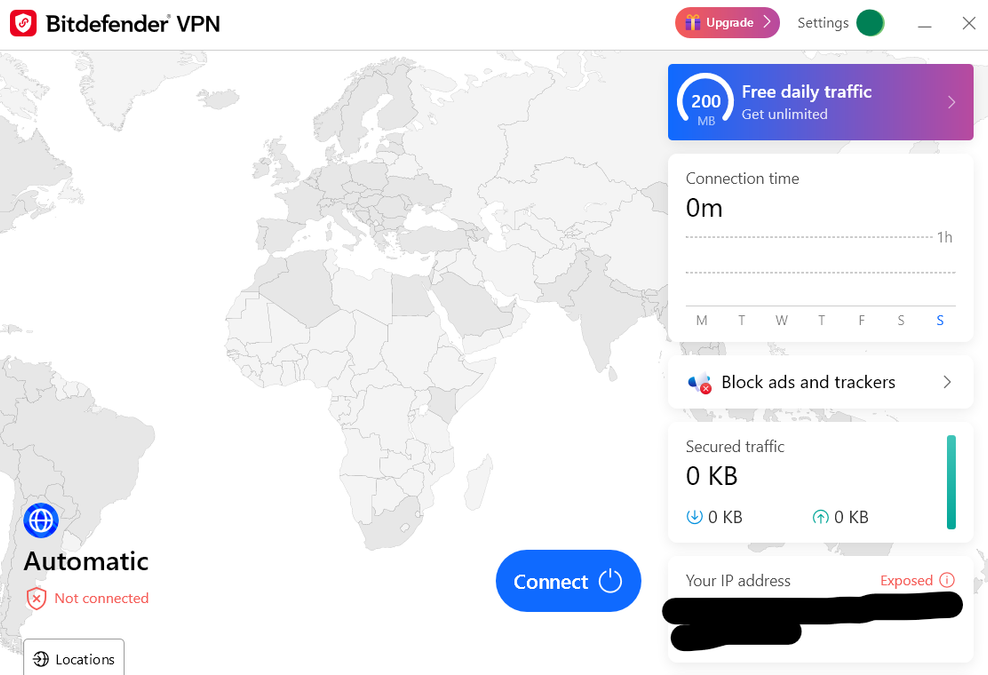
The standard allowance is 200MB per device per day, with automatic server selection. That is a useful emergency connection, not a realistic substitute for an unrestricted VPN.
Premium Security and higher tiers remove the data cap. Bitdefender advertises more than 3,000 servers in over 100 countries, giving it ample geographical coverage for ordinary use.
Current documentation lists WireGuard and IKEv2, with OpenVPN available on Windows and Android. Encryption depends on the selected protocol; describing every connection as using AES-256 would be inaccurate. Automatic protocol selection is the sensible default unless troubleshooting.
The service includes useful privacy controls such as a kill switch, automatic connection options and split tunnelling. The latter can let selected traffic bypass the VPN when a website or application refuses to cooperate. Double-hop routing and additional filtering features are available in supported configurations.
The catch is that availability varies by operating system and protocol. A feature shown in one app is not necessarily usable with every connection method in another.
Standalone VPN documentation specifies ten simultaneous connections. Do not interpret a 25-device security subscription as an unconditional promise of 25 simultaneous VPN tunnels. Confirm the allowance assigned to your particular bundle. Router installation and downloadable router configuration files are not supported.
For streaming, the relevant question is whether it reliably reaches your particular service from your location. No fresh streaming or throughput benchmark is claimed here, so the trial is more useful than an unsupported promise about Netflix. P2P-related connection reminders are documented, but speed will depend on the server, protocol and underlying connection.
Bitdefender says its VPN infrastructure underwent an independent no-logs audit in 2025. That is a positive claim, although it should not be treated as an examination of a publicly inspected audit report here. Its current home privacy policy identifies IPVanish as a VPN service processor.
For everyday privacy, Premium’s VPN is credible added value. Enthusiasts wanting router support, Linux clients, extensive configuration or readily inspectable audit material should compare specialist services more closely.
SecurePass: the password manager has changed
Reviews still recommending the old Bitdefender Password Manager need updating. That service closed permanently on 15 June 2026, with SecurePass taking its place.
SecurePass provides an encrypted, synchronised vault, password generation, autofill and security reports covering issues such as weak, reused or exposed credentials. Browser support includes Chrome, Firefox, Edge and Safari, alongside mobile apps and web access. Sharing functions make it more useful than a bare password list.
Passwords can be imported from supported browsers and managers. That makes switching practical, although exported password files need careful handling because some export formats are unencrypted.
SecurePass can also generate time-based authentication codes for supported accounts. Keeping passwords and codes together is convenient, although people wanting stronger separation may prefer a separate authenticator.
Save the recovery key. If both it and the master password are lost, resetting access does not magically recover the existing vault.
As an included Total Security service, SecurePass adds meaningful value. Someone already comfortable with another good password manager need not migrate merely to make use of the bundle.
Privacy tools and optimisation extras
Anti-Tracker blocks categories including advertising, analytics and social trackers, with exceptions for sites that misbehave. It works with supported combinations of Chrome, Edge, Firefox and Safari, depending on platform. There is overlap with modern browsers’ own privacy controls, but the clearer tracker view and per-site controls can still be useful. It does not make browsing anonymous.
File Shredder overwrites selected files to make conventional recovery harder. Its practical value is greater for traditional hard drives than as a guaranteed SSD-erasure method. SSD wear levelling, snapshots and copies elsewhere mean that shredding one file should not be confused with securely sanitising an entire device.
OneClick Optimizer handles temporary-file, privacy and registry cleanup. Review its proposed changes, particularly browser data that could sign you out or remove useful history. Disk cleanup is convenient; registry cleaning is not a persuasive reason to buy antivirus and should not be expected to transform performance.
Autopilot is better understood as a security adviser than a separate protection engine. Useful recommendations can help someone finish configuring protection. Repeated suggestions can become another notification layer, especially when they concern services the buyer does not want.
Parental controls and anti-theft
Family protection
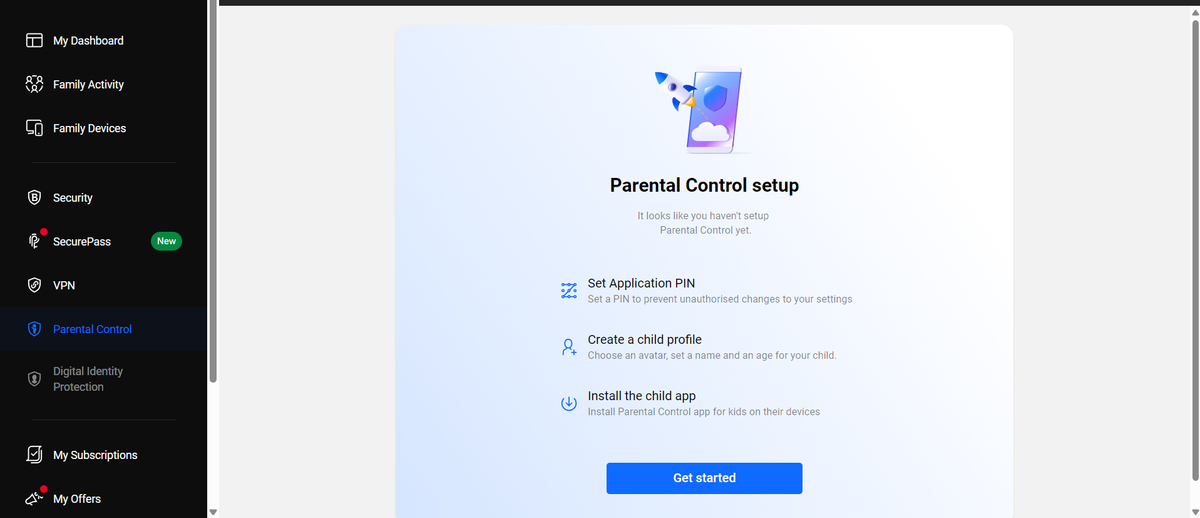
The current parental-control system uses child profiles, content filtering, internet-time allowances and schedules, including Focus Time, Family Time and Bedtime. Parents can review activity, adjust restrictions and grant additional time. Location functions depend on supported mobile devices and the necessary permissions.
The important limitation is internet time versus total device time. Restricting connectivity is not the same as preventing every offline game or application from running. Website and application-related filtering should not be mistaken for universal control over every executable.
SafeSearch and YouTube restrictions provide useful assistance, but no content filter perfectly understands context. Configuration across a child’s devices matters more than choosing the strictest-looking category list.
Setup requires a family profile and the parental application or component on the child’s device. Mobile filtering may use a VPN configuration, with location permissions adding another setup step. Some parental features have higher operating-system requirements than the underlying antivirus.
I would explain the controls to the child rather than treating location and activity reporting as invisible surveillance. These tools work better as part of agreed household rules.
Anti-theft remains available
Android anti-theft includes remote location, locking, wiping and an audible alarm, subject to permissions and connectivity. Supported configurations can also capture information after failed unlock attempts. Windows has supported anti-theft actions too; the same controls do not extend to Mac and iOS.
Remote wiping is a last resort, and the device must be able to receive the command. Built-in lost-device services already provide similar benefits, so this is useful consolidation rather than a unique reason to subscribe.
Mac, Android and iPhone: one subscription, different protection
| Platform | Main strengths | Important omissions or limits |
|---|---|---|
| Windows | Full malware suite, firewall, Safepay, ransomware remediation and privacy controls | Richest feature set also means more settings |
| macOS | Malware and adware protection, Safe Files, Time Machine safeguards and web filtering | No Bitdefender firewall, Safepay or Windows optimiser |
| Android | App scanning, web and scam checks, App Lock and anti-theft | Permissions and background restrictions affect operation |
| iOS/iPadOS | Web filtering, account checks, supported scam tools and VPN | No Windows-style system malware scanner; SMS filtering excludes iPad |
macOS
Mac protection is substantial where it matters: malicious software, adware and dangerous websites. Safe Files restricts unauthorised changes to protected locations, and Time Machine Protection helps defend backups. TrafficLight supplies browser protection.
There is native Apple silicon support. Nevertheless, Windows benchmark results cannot establish Mac performance, and the absence of Windows-only extras should be reflected in the buying decision.
System-requirement pages are not perfectly consistent: older general documentation lists earlier macOS versions, whereas current product pages specify macOS 11.3 or later. Use the requirement attached to the current product and component you intend to install.
Android
Android receives the stronger mobile package. Malware scanning checks apps, App Anomaly Detection looks for suspicious behaviour, and App Lock adds a PIN barrier to chosen applications. Account Privacy checks for exposed account details, with web, scam and anti-theft tools completing the package.
Permissions are essential, not cosmetic. Aggressive battery-saving settings can stop background protection working as intended. Conversely, there is no basis here for promising zero battery impact: usage, permissions and the phone’s own software all matter.
iPhone and iPad
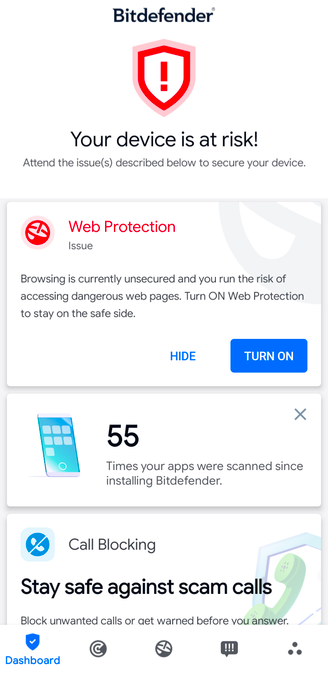
Apple restricts access to other applications and system areas, so Bitdefender cannot inspect an iPhone in the same way it scans a Windows PC. Its value lies in web protection, scam detection, account-exposure checks and VPN access.
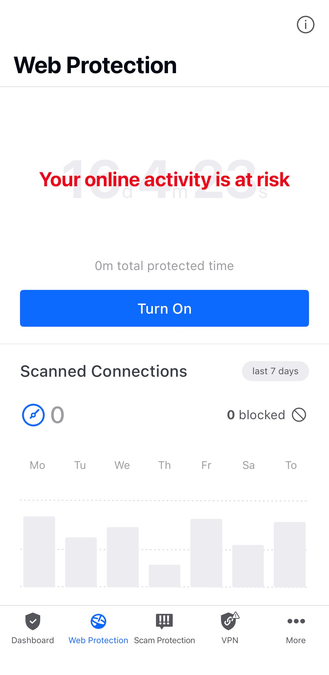
There is a further practical limitation: iOS Web Protection and the VPN cannot operate simultaneously in the Mobile Security configuration. They use competing connection arrangements and must be alternated.
That materially weakens the all-in-one promise for an iPhone-only buyer. It is less troubling when the phone is one device within a Windows-heavy household subscription.
Performance, scanning and gaming
Bitdefender is efficient enough to recommend, but “the lightest antivirus” would overstate the evidence.
AV-TEST awarded full performance marks in May–June 2026. On its standard PC, measured slowdowns included 9% for website launches, 15% for software installation and 2% for file copying, all below the corresponding industry averages.
AV-Comparatives tells a more qualified story. Its April impact score placed Bitdefender behind McAfee, ESET and Norton, among others, although ahead of Microsoft and Malwarebytes. The 9.6 figure is an impact index, not a percentage or mark out of ten.
Quick Scan covers likely trouble spots, System Scan performs a broader examination, and custom or scheduled scans allow more control. Initial scans can take longer than subsequent passes as files are assessed and unchanged content becomes quicker to handle. Archives and large collections increase the workload. Raising scan priority may finish sooner at the expense of foreground responsiveness.
No universal startup delay, RAM footprint, CPU percentage or battery-life figure is justified by these results. In particular, scan-time load should not be confused with ordinary background operation.
Profiles help manage interruptions:
- Work adjusts behaviour around supported productivity applications.
- Movie can postpone maintenance and updates and adjust power settings.
- Game suppresses alerts and postpones scheduled scans and automatic updates.
- Public Wi-Fi strengthens relevant network and web-protection settings.
- Battery Mode reduces background activity and postpones selected tasks.
Only one profile is active at a time, and applications can be added manually if automatic detection misses them.
Bitdefender is a sensible choice for a gaming PC. Game Profile addresses interruptions and background scheduling without requiring the user to abandon protection. Claims of a guaranteed frame-rate boost would need separate game benchmarks.
Identity protection: distinguish monitoring from insurance
Digital Identity Protection monitors exposed personal information and provides breach alerts, an overview of your digital footprint and advice about remedial action. The standalone service supports one identity with up to ten email addresses and five phone numbers. It can be useful after repeated breaches, but cannot remove every leaked record or prevent a company holding your information from being attacked.
Ultimate Security incorporates identity-monitoring benefits. UK buyers should not assume this includes the US credit and insurance package.
The separate Identity Theft Protection service is powered by IdentityForce. Its Standard and Premium options differ in credit-monitoring breadth and insurance limits. The US Ultimate Security Plus range similarly distinguishes Standard and Extended benefits, including one-bureau versus three-bureau monitoring and advertised coverage up to $1 million or $2 million, depending on the option. Restoration specialists are an important part of the proposition.
Insurance limits are not guaranteed payouts. Eligibility, covered losses and household terms matter. These services are most relevant to buyers who specifically want restoration assistance and credit monitoring, rather than simply better antivirus.
Privacy, notifications and customer support
Bitdefender’s home privacy policy, updated on 18 August 2026, describes account information, device and security data, and additional processing for services such as parental controls, scam analysis and identity monitoring. It states that personal data is not sold.
Cloud-assisted protection necessarily involves sending some information beyond the device. Mailbox analysis, location tracking and identity monitoring require more access than a local file scanner. The fair question is whether each optional service is worth that access to you, rather than assuming that a security subscription collects nothing.
Notifications deserve less patience. Security warnings are part of the job; promotional messages in paid software are an annoyance.
Windows settings allow Special offers and Recommendation notifications to be disabled, with corresponding controls in other interfaces. Some trial, expiry or account notices cannot be silenced in the same way. I would switch promotional messages off during setup.
Support is available through chat, telephone, tickets, documentation and the community forum. The published contact page lists 24-hour English-language options, including UK telephone support, although telephone numbers are not necessarily free to call.
The documentation is extensive. Its weakness is consistency, particularly around older products and changing interfaces. No direct support-response test is claimed here, so published availability should not be confused with a measured guarantee of fast resolution.
Free Bitdefender and Microsoft Defender
Bitdefender Antivirus Free for Windows is a legitimate option for someone who wants its core protection without purchasing the suite. It includes real-time malware and web safeguards, but not the full collection of firewall, password, VPN, family and recovery-related extras. It also remains a route into Bitdefender’s paid ecosystem, so do not expect every upgrade message to disappear. A separate free Android antivirus is available.
Does an ordinary Windows user who already has Microsoft Defender need Bitdefender? No.
An updated Windows installation already includes capable antivirus, a firewall and browser-related security features. Controlled Folder Access adds a ransomware safeguard when appropriately configured. Microsoft Defender remains a credible baseline, not an intentionally inadequate placeholder. Microsoft ransomware guidance.
Bitdefender earns its fee through the additional package: more integrated web and scam tools, Safepay, SecurePass, family management and optional VPN or identity services. Defender requires less purchasing effort; Bitdefender offers more in one subscription.
For someone who will use those additions, paying is reasonable. For a careful user happy with existing browser protection, backups and a separate password manager, the improvement may not justify another annual bill.
Bitdefender versus the main alternatives
| Alternative | Where it has an advantage | Why choose Bitdefender instead? |
|---|---|---|
| Norton 360 Deluxe | Includes 50GB of PC cloud backup, VPN and family tools | Particularly appealing Windows banking and ransomware toolkit |
| McAfee+ | Selected plans cover unlimited devices; excellent recent performance result | A strong fit for buyers wanting Bitdefender’s device controls and Central |
| ESET HOME Security | Detailed controls and lower measured performance impact | More immediately appealing banking and family-oriented extras |
| Avast | Strong free entry point; Ultimate bundles VPN and cleanup | Total Security is compelling if SecurePass and family management matter |
| AVG | Familiar interface and an Ultimate bundle with VPN and tuning | Broader appeal for buyers prioritising banking and household security |
| Malwarebytes | A more focused proposition for buyers wanting fewer suite utilities | More extensive device, family and banking tools |
| Kaspersky | Strong technical protection results | US restrictions make it unsuitable as a current US purchasing recommendation |
Norton’s backup is a tangible advantage because Bitdefender’s ransomware remediation is not general cloud backup. ESET is especially worth considering on a machine where measured overhead matters. Malwarebytes should not automatically be assumed lighter merely because it offers fewer visible utilities.
Compare renewal totals, device allowances and services you already pay for. An inexpensive first year can become poor value if half the package duplicates existing subscriptions.
The weaknesses that could change the recommendation
The biggest drawback is the distance between the headline offer and the longer-term purchase. Device counts, family roles, legacy licences and renewal amounts require more attention than a consumer security product should demand.
The restricted Total Security VPN is the next frustration. It is technically included, but its allowance is too small for routine use. Buyers wanting a VPN should price Premium from the start.
Platform differences also affect value. A Windows household gets more from the subscription than an iPhone-only owner, particularly given the iOS VPN and Web Protection conflict. Parental controls should not be bought under the mistaken impression that internet limits block all offline use.
Finally, performance is good rather than unbeatable, promotional notifications need managing, and some extras are ordinary. Registry cleanup does little to strengthen the recommendation. Nor should the presence of AI scam analysis be mistaken for independently proven protection against every new fraud.
None of these issues undermines the core antivirus. They do determine which package, if any, is worth buying.
Pros and cons
| Pros | Cons |
|---|---|
| Excellent recent independent protection results | Not perfect in every protection test |
| Useful Windows ransomware and banking safeguards | Several competitors measured lighter |
| Strong range of web, email and scam tools | Advanced scam services require higher tiers |
| SecurePass adds value to Total Security | Standard VPN restricted to 200MB daily per device |
| Family plans cover five accounts and 25 devices | Account roles and platform limits complicate the headline allowance |
| Central simplifies household management | Renewal pricing and legacy subscriptions need care |
| Good configuration options for beginners and enthusiasts | Promotional notifications and inconsistent documentation |
Final verdict
Bitdefender gets the important part right: strong protection supported by credible independent results. Its best extras, particularly Safepay, ransomware remediation and household management, have clear practical value.
Buy Total Security if you want an excellent everyday security suite and already have your VPN needs covered. Choose Premium Security if its unlimited VPN and expanded scam protection will replace services you would otherwise buy separately. Families should compare the corresponding Family subscriptions.
Windows users receive the strongest package. Buyers seeking the lowest possible overhead should also consider ESET or McAfee, and iPhone-only users have less reason to pay for the full suite. Microsoft Defender remains enough for many ordinary Windows users.
I would recommend Bitdefender confidently, with one condition: choose it for the protection and services you need, then judge the price beyond the first year.