
If you have ever filmed an important event, an on-the-street interview, or a client project only to discover clipped, distorted audio or devastating 2.4GHz dropouts in post-production, you know the sinking feeling. Traditional camera preamps are notoriously noisy, and standard wireless transmitters leave zero margin for error when someone laughs or shouts.
The DJI Mic 2 addresses this nightmare with one headline feature: 32-bit float internal onboard recording. Combined with intelligent noise cancelling, direct Bluetooth connectivity, and a redesigned charging case with a transparent aesthetic, it aims to be the undisputed audio hub for solo video creators, podcasters, and mobile journalists.
Disclosure: This article contains affiliate links. If you make a purchase through these links, Tech Info Central may earn an affiliate commission at no additional cost to you.
Editor’s Choice • Wireless Audio
Quick Specifications Breakdown
| Feature | Specification Details |
|---|---|
| Internal Storage | 8 GB per transmitter (stores ~14 hours of uncompressed 24-bit or 32-bit float audio) |
| Wireless Transmission Range | Up to 250 m (820 ft) line-of-sight (FCC), 160 m (CE) |
| Battery Run Time | 6 hours per transmitter/receiver (~18 hours total with charging case) |
| Direct Connectivity | Bluetooth 5.3 (direct to phone/camera without receiver), 3.5mm TRS, Lightning & USB-C adapters |
| Transmitter Weight | 28 grams (1 oz) per unit |
| Safety Features | 32-bit float internal recording, -6 dB Safety Track option |
Design and Ergonomics: The New Transparent Case and Clip
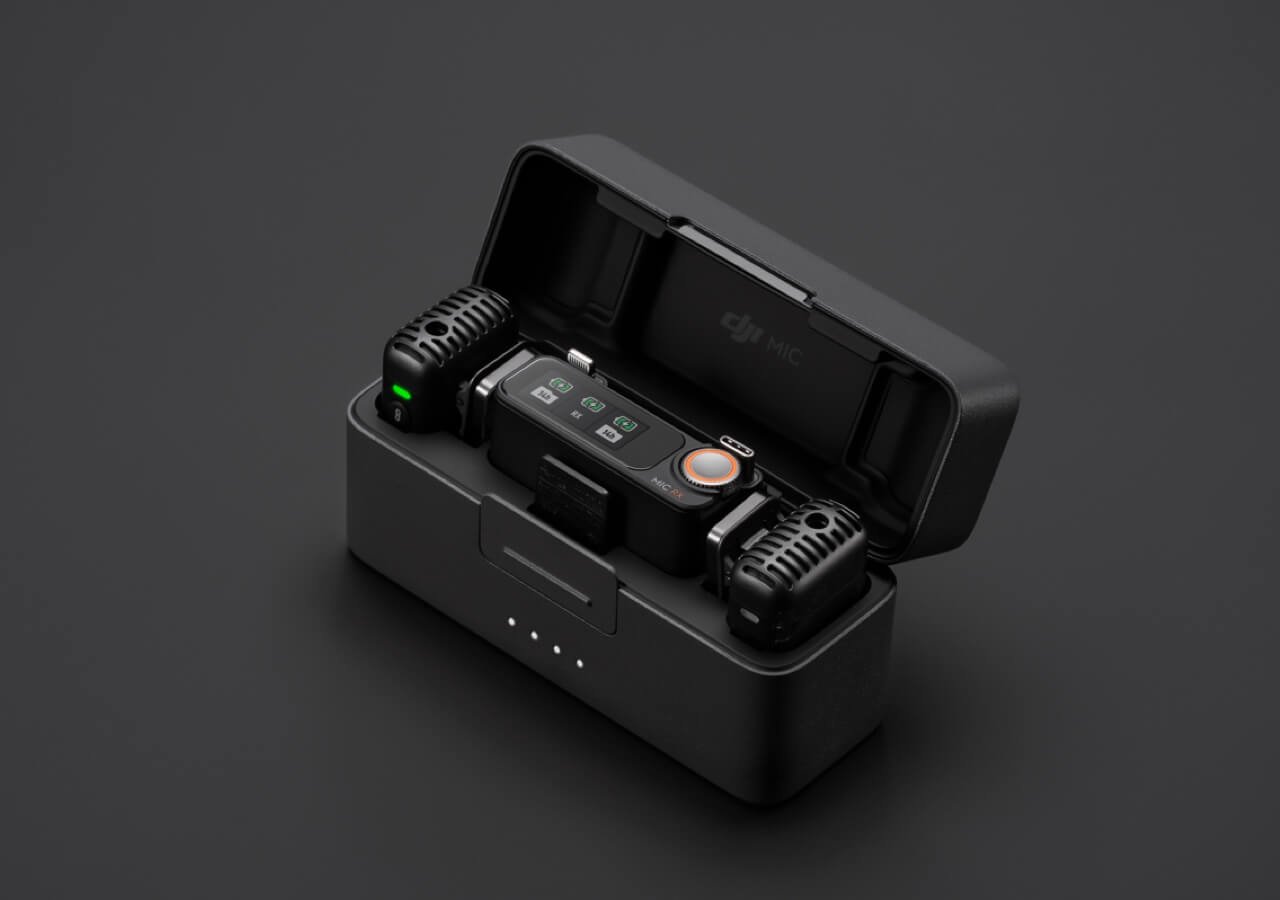
The first tangible improvement over the original DJI Mic is the physical build. The transmitters feature an industrial, semi-transparent top plate showcasing the internal circuitry and microphone capsule. While styling is subjective, the functional improvements are universally practical.

Each transmitter weighs just 28 grams. You can attach it via the sturdy integrated spring clip or use the included high-strength magnetic backing plate. The magnet is strong enough to hold through thick hoodies and jackets, saving you from awkward collar sag that often plagues heavier lapel transmitters.
The receiver has also received a key upgrade: a tactile precision thumbwheel paired with its bright 1.1-inch OLED touchscreen. Adjusting headphone monitoring volume or fine-tuning receiver gain while running and gunning is far faster with a physical wheel than fumbling with sweaty fingers on a tiny display.
32-Bit Float Internal Recording: Why It Is an Absolute Game-Changer
If you take away nothing else from this review, understand this: 32-bit float onboard recording is the single best reason to buy the DJI Mic 2.
In standard 16-bit or 24-bit recording, audio has a fixed dynamic range. If a subject suddenly screams, laughs loudly, or a siren wails nearby, the audio signal hits 0 dBFS and “clips”—the waveform is permanently flattened and distorted beyond rescue. With 32-bit float, the dynamic range is so vast (over 1,500 dB theoretical) that digital clipping essentially ceases to exist in the recorded file.
Intelligent Noise Cancelling: When to Use It (and When to Skip It)
DJI added a two-level environmental noise cancellation algorithm accessible via a quick press of the transmitter button or the receiver menu.

In practical field environments:
- Where it excels: Street interviews with steady low-frequency rumble (traffic, air conditioning hum, passing trains). It effectively carves out background drone while keeping speech intelligible.
- Where to avoid it: Quiet studio or indoor podcast settings. Aggressive digital noise algorithms can introduce subtle phase artifacts or a slightly robotic edge around delicate sibilants. For controlled spaces, leave noise cancellation turned off and let the clean capsule do the work.
Connectivity: Direct Bluetooth vs. Receiver Dongle
One of the Mic 2’s most convenient features is direct Bluetooth pairing. You can connect a transmitter straight to your smartphone (iPhone or Android) or DJI action camera (like the Osmo Pocket 3 or Action 4) without plugging in the receiver module.
However, keep the trade-offs in mind:
- With the Dedicated Receiver: You get uncompressed 2.4GHz transmission with low latency, full dual-channel split recording, safety track options, and full transmitter menu control.
- Direct Bluetooth: Perfect for fast TikTok/Reels creation and quick voice memos. However, Bluetooth audio protocol applies standard compression and you lose the receiver’s real-time monitoring and parameter controls.
If you are looking for dedicated meeting transcription rather than video production, take a look at our Plaud NotePin S review. For editing your finished clips with synced multi-track audio, check out our guide on Wondershare Filmora.
Battery Endurance and Charging Case Utility

Battery performance reliably hits the 5.5 to 6-hour mark per transmitter under real-world continuous recording with 32-bit float enabled. The solid metal charging case holds roughly two full recharges, bringing total operating endurance up to 18 hours.
The case also features an automatic locking clasp that prevents the lid from popping open in your gear bag, and the transmitters auto-pair the moment you lift the lid.
Pros and Cons: The Honest Assessment
✓ What We Love
- 32-bit float internal safety net: Impossible to digitally distort internally clipped audio.
- Hardware dial on receiver: Rapid gain adjustments without digging into sub-menus.
- Direct Bluetooth pairing: Wireless audio straight to phones and Osmo devices.
- Strong magnetic mounts: Clips securely without stretching shirts or collars.
- Comprehensive kit: Includes furry windscreens, phone adapters, and carrying case.
✗ What Could Be Better
- No onboard timecode generator: High-end cinema shooters still need to sync by audio waveform or external slate (unlike the Rode Wireless PRO).
- Price premium: Noticeably more expensive than budget wireless kits like Boya or Hollyland Lark M1.
- Noise reduction in quiet rooms: Can impart a faint hollow coloration if left on indoors.
DJI Mic 2 vs. Rode Wireless PRO: Which Should You Buy?
The main competitor to the DJI Mic 2 is the Rode Wireless PRO. Here is how they stack up:
- Choose the DJI Mic 2 if: You want superior physical ergonomics, an intuitive touchscreen with a hardware jog wheel, direct Bluetooth pairing with phones/action cams, and lightning-fast setup without fiddling with complex desktop configuration apps.
- Choose the Rode Wireless PRO if: You shoot multi-camera cinematic projects and strictly require hardware SMPTE timecode sync, or want locking 3.5mm lavalier connectors for permanent production rigs.
Final Verdict: Is the DJI Mic 2 Worth It?
For independent content creators, YouTube filmmakers, corporate videographers, and run-and-gun documentarians, the DJI Mic 2 is currently the most versatile and reliable compact wireless system available. The peace of mind delivered by 32-bit float internal recording alone justifies the investment—preventing ruined audio takes that you simply cannot re-shoot.