
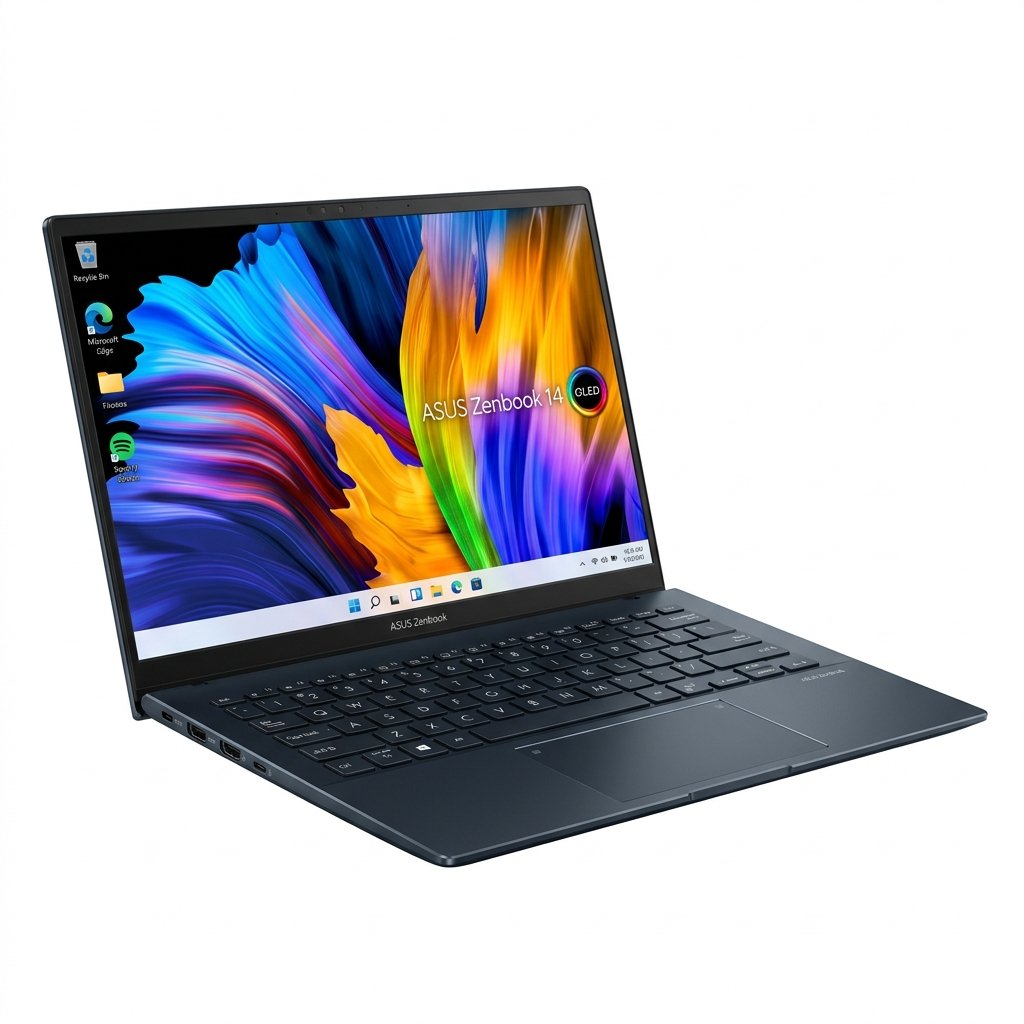
ASUS Zenbook 14 OLED: The Ultimate Creator Laptop

ASUS Zenbook 14 Creator laptop with 14-inch WUXGA ASUS Lumina OLED display, showing 16GB RAM, 512GB SSD, WiFi 7, and Intel Core Ultra 7 branding on screen with colorful abstract background.

Introduction to the ASUS Zenbook 14 OLED

The ASUS Zenbook 14 OLED steps into the spotlight as one of the most capable creator laptops available today. This machine packs everything a professional needs into a compact 14 inch frame that feels premium from the first moment you pick it up. The WUXGA Lumina OLED touch screen sits at the center of the experience, delivering colors and contrast that make every pixel pop. Creators who spend hours editing photos, designing graphics, or cutting video will immediately notice how accurate and vibrant the visuals appear on this panel.

What sets the ASUS Zenbook 14 OLED apart is the way it balances raw power with everyday usability. The Intel Core Ultra processor inside handles heavy workloads without slowing down, while the lightweight aluminum body makes carrying it from studio to client meeting effortless. The touch layer on the display adds real interactivity, letting you pinch to zoom, swipe through timelines, or sketch directly with a compatible stylus. This is not just another laptop; it is a complete creative workstation that travels light.

From the moment you open the lid, the ASUS Zenbook 14 OLED feels intentional. The screen lifts smoothly thanks to the precise hinge, and the keyboard deck rises slightly to create the perfect typing angle. Every element has been refined for long work sessions, from the quiet cooling system to the responsive input devices. In the sections ahead, we will explore the design, the display technology, the internal performance, the input experience, the connectivity options, the battery endurance, the audio setup, and the software features that make the ASUS Zenbook 14 OLED such a standout choice for creators in 2026.

The focus on portability does not come at the expense of capability. This laptop can run demanding creative applications for hours on a single charge, then recharge quickly when needed. The build quality inspires confidence, and the attention to small details like fingerprint resistant surfaces and eco conscious materials shows that ASUS thought through every aspect of daily use. Whether you are a freelance illustrator working from a cafe or a video editor on location, the ASUS Zenbook 14 OLED adapts to your workflow without ever feeling like a compromise.

Design and Build Quality of the ASUS Zenbook 14 OLED

The exterior of the ASUS Zenbook 14 OLED immediately communicates premium quality. The chassis uses a strong aluminum alloy that keeps the total weight down to about 2.65 pounds while maintaining structural integrity. At only 0.59 inches thin, the laptop slides into almost any bag without adding bulk. The lid features a subtle geometric pattern that catches light beautifully and resists fingerprints better than most matte finishes.

When you open the ASUS Zenbook 14 OLED, the ErgoLift hinge raises the rear of the keyboard deck by a few millimeters. This small adjustment improves typing posture, increases airflow for cooling, and directs sound toward the user. The entire body meets rigorous durability testing, so it handles the bumps of travel without issue. Colors like Ponder Blue and Foggy Silver give you options that feel fresh and modern without being flashy.

Vent placement has been optimized so heat escapes efficiently even during extended rendering sessions. The power button doubles as a fingerprint reader, positioned for quick access yet out of the way during typing. Every port and speaker grille aligns perfectly with the overall aesthetic, creating a clean silhouette that looks professional in any setting.

Sustainability plays a role in the construction too. ASUS incorporates recycled materials where possible without sacrificing strength or finish quality. The surface coating protects against scratches, so the laptop stays looking new even after months of constant use. The screen bezels are extremely narrow, giving an 87 percent screen to body ratio that maximizes the viewing area inside the compact chassis.

For creators who work in different environments, the ASUS Zenbook 14 OLED offers practical advantages. The lid opens all the way to 180 degrees, making it easy to share the screen during reviews or presentations. The keyboard deck shows almost no flex when typing forcefully, and the palm rests stay cool thanks to intelligent thermal design. Small touches like rounded corners and a seamless trackpad integration make the whole package feel cohesive and comfortable for all day use.

Amazon Product

The Stunning Lumina OLED Display on the ASUS Zenbook 14 OLED

The 14 inch WUXGA Lumina OLED touch display is the star feature of this laptop. Resolution sits at 1920 by 1200 pixels, delivering sharp text and detailed imagery across the entire surface. Lumina OLED technology brings true blacks because each pixel can turn completely off, creating infinite contrast that makes dark scenes in video edits look cinematic.

Color coverage reaches 100 percent of the DCI P3 space, so the ASUS Zenbook 14 OLED reproduces the rich hues that professional workflows demand. Whether you are color grading footage or retouching portraits, what you see on screen matches your final output with impressive accuracy. The touch functionality supports pressure sensitive input, opening up natural drawing and annotation options when paired with the right stylus.

Refresh rate of 60 hertz keeps scrolling and animations fluid, while the fast response time of 0.2 milliseconds eliminates ghosting in fast moving content. Brightness peaks at 500 nits, so the display stays visible even in brighter rooms or near windows. Low blue light certification reduces eye fatigue, letting you work longer without discomfort.

The glossy finish enhances color vibrancy, and the 16 to 10 aspect ratio gives extra vertical space that is perfect for timelines, tool palettes, or long documents. Viewing angles are wide, with no color shift even when looking from the side, which helps during collaborative sessions. ASUS provides built in calibration tools so you can switch between different color profiles depending on the project.

Palm rejection works reliably, so resting your hand on the screen while drawing does not create stray marks. Pixel shifting technology helps prevent burn in over time, and the screen saver options add another layer of protection. For creators who rely on visual accuracy, this display is a game changer that elevates every task from casual browsing to final export.

Amazon Product

Performance and Hardware Inside the ASUS Zenbook 14 OLED

Under the hood, the ASUS Zenbook 14 OLED uses Intel Core Ultra processors that bring serious computing muscle to a slim chassis. Configurations with up to 16 cores and 22 threads manage multitasking with ease, whether you are running multiple Adobe applications or exporting large files. The integrated graphics handle 4K video timelines smoothly, and the dedicated neural processing unit accelerates AI tools like automatic noise reduction or smart object selection.

Memory options go up to 32 gigabytes of fast LPDDR5X RAM, all soldered for maximum stability in the compact design. Storage reaches 1 terabyte on the NVMe drive, giving you plenty of room for project files and media libraries. Boot times are almost instant, and large file transfers happen in seconds thanks to the high speed interface.

Creative software runs efficiently on this hardware. Photo editing brushes respond instantly, video previews play back without lag, and 3D previews rotate smoothly. The thermal system keeps temperatures in check with a single quiet fan, so the laptop stays comfortable on your lap during long sessions. Performance modes in the companion app let you choose between maximum power or extended battery life depending on the task at hand.

The operating system is Windows 11 Pro, optimized for the hardware with features that speed up common creator workflows. System utilities monitor resource usage and suggest optimizations automatically. Overall, the combination of processor, memory, and storage makes the ASUS Zenbook 14 OLED feel responsive and capable no matter how complex the project becomes.

Amazon Product

Keyboard, Trackpad, and Input on the ASUS Zenbook 14 OLED

Typing on the ASUS Zenbook 14 OLED is a pleasure thanks to 1.4 millimeter key travel and a stable scissor mechanism. Backlighting adjusts automatically or manually, and the key layout includes quick access to media controls and AI shortcuts. The keys have a gentle concave shape that guides fingers naturally, reducing mistakes during long writing or coding sessions.

The large glass trackpad supports precise gestures and includes a hidden numeric keypad that lights up when needed. Haptic feedback gives satisfying clicks without actual moving parts, and the surface resists oils so it stays clean. Four finger gestures make desktop navigation fast and intuitive.

The 1080p webcam with infrared sensor handles video calls and facial login with clarity. AI enhancements improve low light performance and reduce noise in the microphone array. Voice capture stays clear even in busy environments, making the laptop suitable for podcast recording or client calls.

Ports and Connectivity on the ASUS Zenbook 14 OLED

The ASUS Zenbook 14 OLED offers a well rounded selection of ports. Two Thunderbolt 4 connections handle high speed data, external displays, and charging. A USB 3.2 Type A port accommodates older peripherals, HDMI 2.1 outputs to monitors or projectors at 4K, and the 3.5 millimeter jack covers audio needs.

Wi Fi 6E delivers fast wireless speeds, and Bluetooth 5.3 pairs accessories reliably. The laptop can drive multiple external screens at once, expanding your workspace when docked. All ports are positioned thoughtfully on the sides to keep cables organized and out of the way.

Amazon Product

Battery Life and Charging on the ASUS Zenbook 14 OLED

A 75 watt hour battery powers the ASUS Zenbook 14 OLED through full workdays of creative tasks. Light use like document editing or web research stretches to 15 hours, while intensive video editing still delivers 8 to 10 hours. The compact 65 watt charger brings the battery to 60 percent in under an hour, and smart charging features protect long term health by limiting maximum charge when desired.

Power efficiency from the processor and display helps achieve these numbers without sacrificing performance when needed. Creators on the move appreciate not having to hunt for outlets constantly.

Audio and Multimedia on the ASUS Zenbook 14 OLED

Harman Kardon tuned speakers with Dolby Atmos support fill the room with rich sound. Highs stay clear and bass has surprising depth for such a thin chassis. The setup works well for music playback, video review, or even light production work.

The microphone system uses AI to cut background noise, keeping your voice front and center. Combined with the high quality webcam, the ASUS Zenbook 14 OLED becomes a solid hub for content creation and communication.

Amazon Product

Software Features and Extras on the ASUS Zenbook 14 OLED

ASUS includes helpful utilities for system control, display management, and device syncing. These tools integrate smoothly with the hardware, offering quick access to performance settings and screen sharing options. Security elements like TPM 2.0 and BIOS protection keep your projects safe.

Stylus support adds another creative dimension, with pressure sensitivity that feels natural for digital art. The overall software experience enhances the hardware without getting in the way.

Why the ASUS Zenbook 14 OLED Stands Out for Creators

Every part of the ASUS Zenbook 14 OLED works together to support creative work. The display inspires better visuals, the performance keeps projects moving, the design encourages mobility, and the battery lets you focus on ideas instead of power outlets. For anyone serious about making content on the go or in the studio, this laptop delivers a complete package that feels premium and practical at the same time.

The attention to detail in build, display, input, and endurance makes daily use enjoyable and productive. If you want a machine that grows with your creative ambitions while staying light enough to travel anywhere, the ASUS Zenbook 14 OLED checks every box with style and substance.

Buy Now on Amazon

Secure checkout and fast delivery.

Similar Posts

Leave a Reply

Your email address will not be published. Required fields are marked *