
This post may contain affiliate links. If you buy something through one of these links, Tech Info Central may earn a small commission at no extra cost to you.
A Satechi Mac Mini Hub review needs to begin with compatibility, because Apple has changed the Mac mini’s physical design across generations.
Satechi’s aluminium hub-and-stand products are designed to sit neatly under compatible Mac mini models while adding easier-to-reach ports and, on SSD-equipped versions, internal M.2 storage.
That can be an elegant solution, but you should check the exact Satechi model against your exact Mac mini generation before buying.

The Basic Idea Is Excellent
The Mac mini is compact because Apple moves most expansion outside the computer.
That looks clean until several drives, card readers and accessories are hanging from the back.
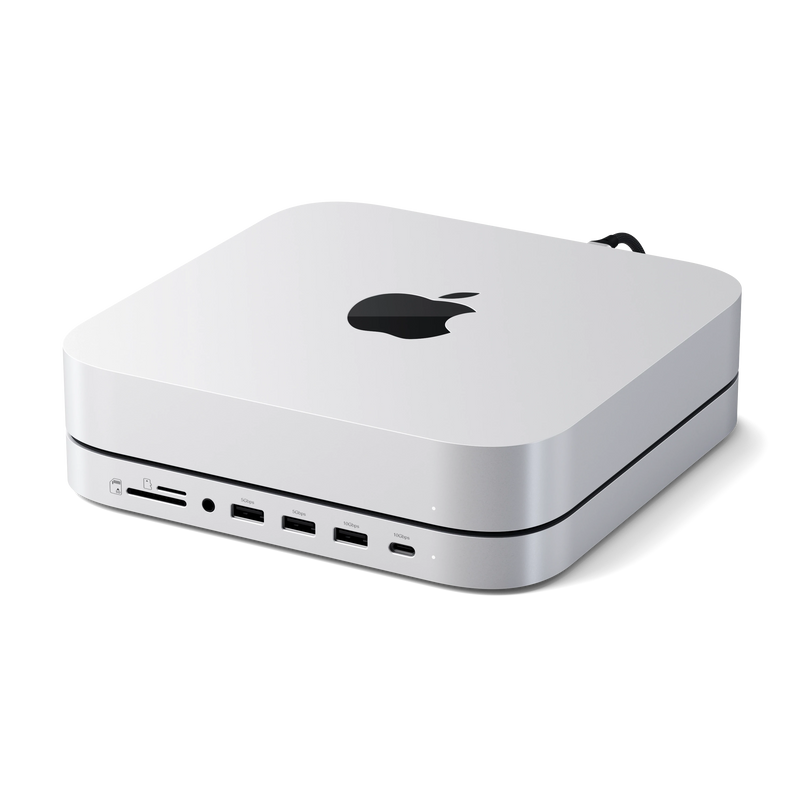
Satechi’s stand turns the empty space beneath a compatible Mac mini into an expansion layer.
Instead of putting another rectangular hub beside the computer, the accessory visually becomes part of the stack.
For a tidy desk, that is immediately appealing.
Front-Facing Ports Are More Useful Than They Sound
The Mac mini’s rear ports are fine for devices that stay connected.
They are less convenient for an SD card, USB flash drive or cable that is plugged in for five minutes.
Moving those connections to the front makes everyday use easier.

You do not have to rotate the computer or reach behind a monitor every time you want to import photographs.
That convenience is the strongest reason to buy a dedicated Mac mini hub instead of a generic USB-C dongle.
The M.2 SSD Enclosure Can Add Useful Storage
Supported versions of the Satechi stand include an internal M.2 enclosure.
That is valuable because Apple’s internal storage upgrades are expensive and cannot normally be changed after purchase.

Adding an SSD to the hub can provide space for:
- photo and video libraries
- games
- large downloads
- project files
- backups
- media archives
Do not expect an external SSD in a hub to behave exactly like the Mac’s internal drive.
The connection speed and controller place a ceiling on performance.
For bulk storage and normal file work, that may not matter. For very demanding professional scratch-disk workloads, a dedicated high-speed Thunderbolt enclosure can be faster.
NVMe and SATA Compatibility Needs Checking
Different Satechi revisions support different SSD types.
Some older versions support SATA M.2 drives, while newer models may support NVMe or a wider range of modules.
Do not buy an SSD first and assume it will fit.
Check the exact model number of the hub, the supported M.2 length and the storage interface.
That one step avoids the most common frustration with this type of accessory.
The Aluminium Design Fits the Mac Mini
Satechi has made a business out of accessories that visually match Apple hardware.
The aluminium finish and low-profile shape make the hub look less like an add-on than many plastic docks.
That does not improve transfer speed, but it matters when the whole point of buying a Mac mini is having a compact desktop.
A hub that creates more clutter would solve one problem by creating another.
It Is Still a Hub, Not a Full Dock
A USB-C hub shares the bandwidth of the connection feeding it.
If you attach several fast storage devices and transfer data between them at the same time, those devices may compete for available bandwidth.
The same principle applies to any multi-port hub.
For keyboards, card readers, occasional drives and ordinary accessories, it is rarely a problem.
For a workstation with multiple high-speed SSDs and demanding displays, a Thunderbolt dock may be a better investment.
Who Should Buy It?
The Satechi Mac mini hub makes sense for:
- Mac mini owners who frequently use removable storage
- photographers
- people who want a cleaner desk
- users who need inexpensive external SSD capacity
- anyone tired of reaching behind the Mac for temporary connections
Pros
- Fits neatly under compatible Mac mini models
- Brings useful ports to the front
- SSD enclosure on supported versions
- Cleaner than a loose USB hub
- Aluminium construction matches Apple hardware well
Cons
- Compatibility varies by Mac mini generation
- SSD support differs between hub revisions
- Shared USB bandwidth limits heavy multi-drive use
- High-speed Thunderbolt docks can offer better professional performance
Buy Now on Amazon
Get fast delivery and secure checkout directly from Amazon.
Final Verdict
The Satechi Mac mini hub is a simple accessory with a sensible purpose.
It makes the ports you touch every day easier to reach and can add relatively inexpensive storage without putting another box on the desk.
The only part that requires real care is compatibility.
Confirm the exact Mac mini generation and Satechi model before buying. If they match, the stand is one of the tidier ways to expand a compact Mac desktop.